SpicyBox: AI Video Generator
- 4.5
- Rating
- 10.00K
- Installs
- Free
- Price

 Analysis by App-foxy
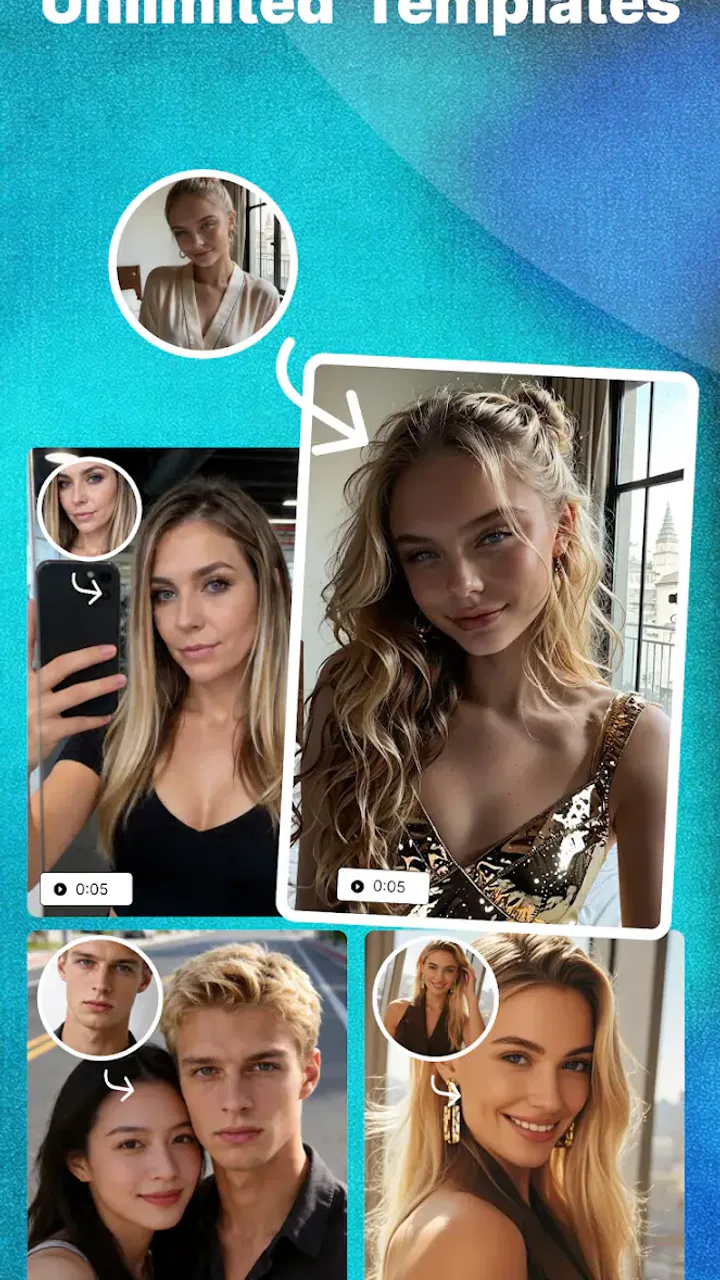
I approached SpicyBox as a quick way to turn an idea into an AI-made visual rather than as a conventional camera editor. Its focus is clear from the first impression: creating sensual-looking photos and videos with a hyper-realistic style. That makes it more specialized than a general photography app, and it also means the right expectations matter. I would not install it for everyday camera corrections, family albums, or detailed manual retouching. I would consider it when I want to explore an AI-generated concept with a more provocative visual tone.
The app is listed in the Photography category and is free to use. It comes from Iqra Shahzadi, has an Everyone content rating, and runs on Android 8.0 or later. The current release is version 1.0.1, while its store presence shows a 4.5 average from roughly seventy-seven ratings and more than ten thousand installs. Those figures suggest that it has attracted early interest, although I still see it as a focused, relatively new tool rather than a mature replacement for established photo suites.
From a rough idea to a finished AI visual
I find the most useful way to judge SpicyBox is to separate the speed of getting an initial visual from the time it takes to make that visual worth keeping. A clear, focused idea gives the generator a better starting point; the more details I pile on, the more careful I need to be when assessing the result. That distinction leads naturally to the heavier-use moments, where reviewing and comparing outputs matters as much as creating them.
You May Also Like

 AccuWeather: Weather Radar
AccuWeather Review: A Quick, Clear Forecast for Everyday Decisions
For everyday plans, the best forecast is the one you can understand quickly. AccuWeather makes rain timing, radar, and local conditions easy to act on, with a few trade-offs.

 Hill Climb Racing
Why Hill Climb Racing Still Turns Crashes Into One More Run
A tiny car, a bumpy hill and one more upgrade: Hill Climb Racing keeps resurfacing because its simple chaos makes every near-miss feel personal.

 AliExpress - Shopping App
AliExpress Makes Global Shopping Feel Personal, but Shoppers Bear the Risk
AliExpress turns a global marketplace into a pocket-sized discovery engine. Its reach is useful, its shopping loop compelling, and its trade-offs easy to miss.

 Lords Mobile: Kingdom Wars
Lords Mobile Is a Kingdom-Building Routine, Not a Quick Match
A case-by-case verdict on the building, battles, device demands, and social commitments that make Lords Mobile rewarding for some players and exhausting for others.

 PDF Scanner app - TapScanner
TapScanner Makes Paperwork Easier to Capture, Check, and Share
TapScanner makes scanning with a phone feel less like a rescue operation and more like a dependable step in getting work done. Its capture tools are useful, though not flawless.

 Block Blast!
 Shows How Much a Puzzle Game Can Leave Out
A quiet grid game shows why puzzle players increasingly value instant clarity, repeatable skill and low-pressure play—and where the genre still needs to catch up.
More From Our News Desk
View All News


Starting with the right kind of input
The most important part of using SpicyBox is deciding what I want before opening it. A vague request such as “make something attractive” leaves too much room for an output that feels generic or misses the mood entirely. I get better results when I begin with a simple visual brief: the subject, setting, lighting, clothing style, camera perspective, and overall atmosphere. I also decide whether I am aiming for a still image or a short moving sequence, because a visual that works as a portrait may not translate naturally into motion.
This planning step is especially useful here because the app is not positioned as a broad creative suite. Its store summary centers on AI-generated sensual photos and videos, so the creative direction is narrower than what I would expect from a standard editor. I would use it for mood boards, fictional character concepts, social posts with a dramatic aesthetic, or experiments with fashion and portrait styling. I would not treat it as a reliable tool for documenting real people or producing a faithful record of a real event.
There is also a practical boundary that I would keep in mind before creating anything: sensual imagery requires careful attention to consent, age, identity, and context. The Everyone rating describes the app’s store classification, but it should not be read as permission to create or share any kind of image. I would keep concepts clearly adult, fictional where appropriate, and respectful of real people. I would also avoid using someone’s likeness without their permission, especially when the result could be mistaken for an authentic photograph.
Moving through the creation process
Once I have a concept, the natural workflow is to enter the idea, choose the kind of visual I want, and let the generator interpret it. The appeal is the reduction in technical work. Instead of arranging layers, masking a subject, adjusting skin tones, and animating a scene manually, I can begin from a description and review the result. For someone who does not enjoy conventional editing, that can make experimentation feel much more approachable.
My advice is to change one creative element at a time when refining an output. If the first result has the right lighting but the wrong pose, I would keep the lighting language and adjust only the pose. If I rewrite the entire request every time, it becomes difficult to understand which instruction helped. This is a small but valuable workflow habit: treat each attempt as a controlled revision rather than a completely new guess.
For still images, I would keep the description concrete and avoid stacking too many competing ideas. A clean portrait brief with one setting and one lighting direction is easier to judge than a request that combines a studio, beach, nightclub, vintage film look, fantasy costume, and several camera angles. The more ambitious the concept, the more likely the generator is to compromise between details. SpicyBox is most useful when I give it a strong central idea and leave enough room for interpretation.
Video generation needs a different mindset. Motion exposes problems that can remain hidden in a single frame: inconsistent hands, shifting facial details, unstable clothing, or a background that changes between moments. I would therefore judge a generated clip as a sequence, not just by its opening image. A striking first frame is not enough if the movement feels artificial or the subject changes identity while the clip progresses.
Handling the handoff from generation to sharing
The handoff between an AI result and a finished piece is where I would slow down. A generated image is not automatically ready for a public post. I would inspect faces, fingers, text-like markings, jewelry, fabric edges, and reflections before sharing. These areas often reveal synthetic mistakes more quickly than the overall composition. With a sensual image, those errors can be especially distracting because the viewer’s attention is already directed toward the subject and body language.
I would also separate private experimentation from public publishing. During the first few attempts, I might save several variations and compare them side by side. The most attractive version is not always the most believable one. Sometimes a slightly less dramatic pose looks more natural, while an image with extreme detail can draw attention to rendering flaws. Choosing the result is part of the creative process, not a task to leave until the end.
For video, I would watch the entire result before sending it anywhere. A short clip can look convincing in a preview and then reveal a sudden transition, awkward motion, or a background that does not hold together. If the app offers a direct saving or sharing route in the version I am using, I would still treat that as a handoff rather than a final approval. I would review the file outside the generator, check its appearance on the intended platform, and make sure the context does not make the fictional material look like a real person’s private content.
This is also where SpicyBox differs from a traditional photography app. In a normal editor, I usually know the source image and can trace an adjustment back to a slider or brush stroke. With AI generation, the result is interpretive. I may get a beautiful composition without being able to reproduce every detail exactly. That is a creative advantage when I want surprise, but a limitation when I need consistency across a campaign, a character series, or multiple matching scenes.
What the result is good for
The strongest outcome is fast visual exploration. I can test a mood, character direction, or provocative fashion concept without first learning a complicated editing workflow. That makes the app appealing to casual creators who want to see an idea take shape quickly. It can also help someone prepare a reference for a later project: the generated image may not be the final asset, but it can communicate a pose, color atmosphere, or styling direction to a designer or photographer.
A realistic everyday scenario would be planning a themed social post. I might start with a dark studio portrait concept, generate several variations, compare the lighting and composition, and choose one that communicates the intended mood without looking overworked. I could then use the selected image as inspiration for a real photoshoot or as a fictional visual for a personal creative account. The useful part is not simply pressing a button; it is moving from an unclear idea to a group of visual options that I can evaluate.
Another worthwhile use is private concept development. A writer, illustrator, or independent creator may need a quick reference for an adult character’s styling or environment. SpicyBox can be more convenient than searching through unrelated stock photography because the starting point is an original description. Still, I would treat the output as a draft reference. If the project demands exact anatomy, repeatable character identity, or professional art direction, a dedicated image workflow remains the safer choice.
The video side is more useful for people who want movement and atmosphere rather than precise filmmaking. A generated clip can help test whether a concept feels energetic, intimate, mysterious, or theatrical. It is less suitable when timing, continuity, choreography, or a recognizable person must be controlled closely. I would judge it as an idea generator first and a finished production tool second.
Where the workflow breaks down
The biggest friction is the gap between a convincing still and a dependable final asset. Hyper-realistic styling raises the standard: the closer an image tries to look like a photograph, the more visible small inconsistencies become. An unusual hand, unnatural eye direction, or warped object can undermine the whole result. I would expect to spend time selecting and rejecting attempts, even when the basic concept is good.
Another limitation is control. Traditional photography apps give me predictable tools for cropping, color, exposure, sharpening, and retouching. SpicyBox’s appeal is that it handles much of the visual construction for me, but that convenience also means I may not be able to correct a single detail without influencing the rest of the image. If I need a specific brand color, exact product shape, consistent face, or repeatable pose, I would choose a more controllable editor or a professional generative workflow.
There is a similar trade-off with authenticity. The app’s visual direction may be useful for fictional or stylized work, but realistic synthetic imagery can be misunderstood when removed from its original context. I would label or explain AI-created material when that matters, and I would never present an invented intimate image as evidence of a real event. That is not a minor publishing detail; it affects whether the result is responsible to share.
I would also skip this app if my main goal is ordinary photography. For correcting a phone picture, removing a distracting object, making a collage, or applying familiar filters, a standard photo editor is likely to be faster and more predictable. SpicyBox makes more sense when the starting point is an imagined scene and the desired outcome is an AI-generated sensual photo or video.
Who should try it, and who should look elsewhere
I see the best fit as an adult creator who wants quick visual experiments, understands that generated media needs review, and is comfortable refining an idea through several attempts. It may suit people making fictional mood boards, fashion concepts, dramatic portraits, or short atmospheric clips. The free price also lowers the barrier to trying the workflow before deciding whether it belongs in a regular creative routine.
I would be more cautious about recommending it to a professional who needs guaranteed consistency, detailed export control, or a documented production process. I would also steer away anyone looking for a conventional camera companion, a full retouching toolbox, or a dependable way to reproduce a real person’s appearance. Those needs favor established photography editors, dedicated video software, or a carefully managed professional AI pipeline.
The age classification is Everyone, but the subject matter still deserves adult judgment. Parents, educators, and people sharing a device should consider the app’s sensual focus before installing it. The classification does not change the need to handle generated images thoughtfully, particularly when a result could be confused with a real person or circulated without consent.
My final take after following the full workflow
SpicyBox: AI Video Generator is most interesting when I use it as a fast bridge between an idea and a visual draft. Its specialized focus separates it from ordinary photography apps, and its free availability makes experimentation straightforward. I like the possibility of moving from a short concept to a sensual photo or video without building the scene manually, but I would not mistake speed for complete control.
The practical lesson is to plan the input, refine in small steps, inspect every result, and treat sharing as a separate decision. That workflow helps reveal both the app’s strength and its weakness: it can open creative directions quickly, while the final quality still depends on careful selection and responsible handling. With an average of about 4.5 from its early ratings and a growing audience, it has enough interest to justify trying, especially for curious visual experimenters.
My recommendation is therefore conditional but positive. If you want fictional, AI-generated sensual imagery and are willing to review the output closely, SpicyBox is an accessible place to explore that idea. If you need ordinary photo editing, precise art direction, or professional-grade continuity, I would choose another tool. Used for the right starting condition and with realistic expectations about the handoff from generation to publication, it can be a useful creative sketchbook rather than a complete photography studio.
FAQs for SpicyBox: AI Video Generator
01What is SpicyBox: AI Video Generator and how does it work?
SpicyBox: AI Video Generator is a cutting-edge app that allows users to create high-quality videos using artificial intelligence. It offers a user-friendly interface where you can input text or images, and the AI processes this data to generate engaging video content. This app is ideal for both personal and professional use, making video creation accessible to everyone.
02Is SpicyBox suitable for beginners or do I need prior experience in video editing?
SpicyBox is designed with beginners in mind, featuring an intuitive interface that requires no prior video editing experience. The AI handles the complex aspects of video creation, allowing users to focus on content and creativity. Advanced users can also benefit from the customization options available to fine-tune their videos.
03What platforms is SpicyBox available on, and are there any system requirements?
SpicyBox is available for both Android and iOS devices. To ensure smooth performance, it is recommended to have a device running Android 8.0 or later, or iOS 12.0 or later. Adequate storage space is also necessary to handle video files, and a stable internet connection is essential for optimal functionality.
04Are there any in-app purchases or subscriptions required to use SpicyBox?
SpicyBox offers a free version with basic features, allowing users to get a feel for the app. For access to premium features such as high-resolution exports, additional templates, and enhanced editing tools, users can opt for a subscription model. This ensures users have the flexibility to choose according to their needs and budget.
05How does SpicyBox ensure the privacy and security of my data?
SpicyBox prioritizes user privacy and data security by implementing robust encryption and data protection protocols. The app does not store your content on its servers without consent, and users have full control over their data. Regular updates and compliance with privacy regulations further enhance user trust and safety.
Pros
- Intuitive user interface for easy navigation.
- Wide range of customization options.
- Fast processing and rendering times.
- High-quality video output.
- Regular updates with new features.
Cons
- Requires a stable internet connection.
- Some features locked behind paywall.
- Limited free version capabilities.
- Occasional crashes on older devices.
- Lacks advanced editing tools.

SpicyBox: AI Video Generator
Gallery